


Free Excel & Google Sheets Tracker included — Scroll to bottom and signup to download ↓
You won the client. The contract is signed. And then the next two weeks go sideways: the intake details are scattered across emails, the deposit is “coming soon,” nobody has the logins, and the kickoff call keeps slipping.
None of that is a client problem. It is a process problem, and it is one of the cheapest ones to fix. A written client onboarding workflow gives every new client the same clear start, and it tells you at a glance who is stuck and why.
In this guide you will get a five-phase workflow, an 8-step checklist with due dates, the intake questions worth asking, light automation you can set up for free, and a ready-made tracker for Excel and Google Sheets.
[ADD: 2 to 3 sentences from your own experience. For example, a time an onboarding went wrong in your business or a client’s, and what it cost in time or goodwill.]
What is a client onboarding workflow?
A client onboarding workflow is the repeatable set of steps between “yes, let’s work together” and “work is under way.” It covers four things:
- Commitment: signed agreement and first payment.
- Information: the details, files and access you need.
- Alignment: a kickoff conversation that settles goals, scope and timing.
- Setup: your internal project and a date for the first deliverable.
Without it, each client gets a slightly different experience(poor onboarding experience), and the gaps show up as delays, rework and awkward chasing emails.
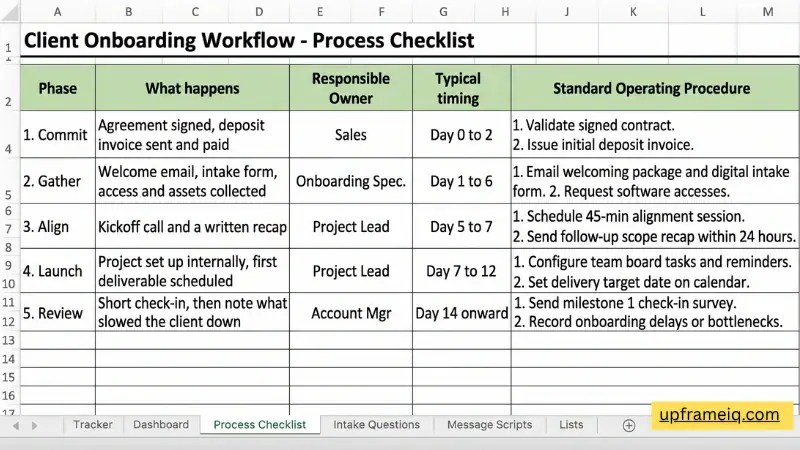
The 5-phase client onboarding workflow
The timings below suit a small service business with a roughly two-week onboarding. Treat them as a starting point and adjust to your work.
| Phase | What happens | Typical timing |
|---|---|---|
| 1. Commit | Agreement signed, deposit invoice sent and paid | Day 0 to 2 |
| 2. Gather | Welcome email, intake form, access and assets collected | Day 1 to 6 |
| 3. Align | Kickoff call and a written recap | Day 5 to 7 |
| 4. Launch | Project set up internally, first deliverable scheduled | Day 7 to 12 |
| 5. Review | Short check-in, then note what slowed the client down | Day 14 onward |
The key idea is that every phase ends with something you can see and tick off. If you cannot tell whether a phase is finished, it is not defined well enough yet.
The 8-step client onboarding checklist
These are the eight steps the free template tracks. Each has a “done” test and a suggested due day counted from the start date.
| # | Step | Due by | It is done when… |
|---|---|---|---|
| 1 | Agreement signed | Day 1 | You hold a signed copy, not a verbal yes |
| 2 | Invoice / deposit paid | Day 2 | The payment has arrived, not just been promised |
| 3 | Intake form received | Day 4 | All required questions are answered |
| 4 | Welcome email sent | Day 1 | The client knows what happens next and who to contact |
| 5 | Access and assets collected | Day 6 | You can log in and open every file you need |
| 6 | Kickoff call done | Day 7 | Goals, scope and dates are agreed |
| 7 | Project set up in tools | Day 9 | Tasks, folders and reminders exist |
| 8 | First deliverable scheduled | Day 12 | The client has a date and knows what you need before it |
Two habits make this checklist work. First, only mark a step done when the “done when” test is true. Second, send a short written recap after the kickoff call so that what was agreed does not live only in memory.

What to ask in your client intake form
A good intake form is short enough to finish in about ten minutes and specific enough to prevent surprises. These ten questions cover most service businesses:
- Full name, company and best contact method.
- Who else should be copied on project emails?
- What result do you want from this work in the next 90 days?
- What have you tried before, and what went wrong?
- What does success look like, and how will you measure it?
- Do you have a fixed deadline or event we must hit?
- Who gives final approval, and how quickly can they respond?
- What accounts, files or logins will we need access to?
- How and when do you prefer to communicate?
- Is there anything we should know about, such as budget limits or tools you dislike?
Question 7 deserves special attention. Slow or unclear approvals are one of the most common reasons projects stall, and clients rarely mention them until it is a problem.
How to automate client onboarding without paid tools
You do not need a CRM or a paid automation platform to get most of the benefit. Start with these three levels and stop when it feels like enough.
Level 1: Let the spreadsheet do the watching
In the free template, you enter a start date and mark each step “Yes” as it is completed. Formulas then work out the go-live target, percentage complete, the next step still open, and a status of On Track, Behind, Overdue or Complete. A step turns red when it is past its due day. This removes the daily “where are we with this client?” question.
Level 2: Send the intake form automatically
Create your intake questions in a Google Form and send the link in your welcome email. Responses land in a Google Sheet, so nothing gets lost in an inbox. Saved email templates (in Gmail or your email app) let you send the welcome message, the reminder and the recap in a few clicks.
Level 3: Get a daily email of clients who need attention
If you use the template in Google Sheets, a small Apps Script can email you a list of clients who are Behind or Overdue each morning. Open the sheet, go to Extensions > Apps Script, paste the code below, and save it.
function sendOnboardingDigest() {
  const sheet = SpreadsheetApp.getActiveSpreadsheet().getSheetByName('Tracker');
  const rows = sheet.getRange(5, 1, 200, 22).getValues();
  const urgent = rows.filter(r => r[1] && (r[20] === 'Overdue' || r[20] === 'Behind'));
  if (urgent.length === 0) return;
  const lines = urgent.map(r => r[1] + ' (' + r[5] + '): ' + r[20] + '. Next step: ' + r[18]);
  MailApp.sendEmail(
    Session.getActiveUser().getEmail(),
    'Onboarding: ' + urgent.length + ' client(s) need attention',
    lines.join('\n')
  );
}
Then click the clock icon (Triggers), choose Add Trigger, select sendOnboardingDigest, set it to a time-driven day timer, and pick a morning hour. Google will ask you to authorize the script the first time. Test it on a copy of your sheet before relying on it, and keep the column layout of the template unchanged, because the script reads columns by position.

If you later outgrow the spreadsheet (for example, many clients at once or several team members), that is the moment to look at a dedicated project or CRM tool. Until then, a clear process matters far more than the software.

Free client onboarding template (Excel and Google Sheets)
The template pulls everything above into one file:
- Tracker: one row per client with 8 step columns, due-day settings, auto status, next step and go-live date.
- Dashboard: counts by status, completion rate, and a chart showing which step clients most often leave unfinished.
- Process Checklist: the five-phase procedure with owners and timing.
- Intake Questions: the ten questions above, ready to paste into a form.
- Message Scripts: eight copy-paste emails, from welcome to go-live.
- Lists: change the go-live length, packages and settings.
How to start (about 10 minutes):
- Download the file:
Get the Free Client Onboarding Tracker
- Delete the five sample rows in the Tracker sheet.
- Add a client, enter the start date, and mark steps “Yes” as they are finished.
- Check the Dashboard weekly to see where clients get stuck.
To use it in Google Sheets, upload the file to Google Drive, right-click it and choose Open with > Google Sheets. Recheck the Dashboard chart after importing.
5 mistakes that stall client onboarding
- Starting before the deposit is in. Work begun on a promise makes later payment conversations harder. If late payments are already a problem, read our guide on what to do when a client is not paying an invoice.
- A long intake form. Ask only what you need to start. You can gather the rest during the kickoff call.
- No named owner. Every client should have one person responsible for the next step.
- Skipping the written recap. A short email after the kickoff call prevents most scope arguments.
- Never reviewing the process. After each client, note what slowed things down and fix it once, in the template.
Where onboarding ends and follow-up begins
Onboarding gets the client started. After that, you still need a rhythm for keeping in touch, answering questions and noticing when a conversation goes quiet. Our client follow-up tracker template and the guide to a customer follow-up system pick up where this workflow stops. And if you are still doing any of this by hand, see the hidden costs of manual data entry.
Frequently Asked Questions About Client Onboarding
How long should client onboarding take?
For most small service businesses, one to two weeks is realistic. The right length depends on how much information you need from the client and how quickly they respond. The template uses 14 days by default, and you can change it in the Lists sheet.
What should a client onboarding checklist include?
At a minimum: a signed agreement, first payment, an intake form, a welcome message, access to the files and accounts you need, a kickoff call, internal project setup, and a date for the first deliverable.
Can I automate client onboarding in Google Sheets?
Yes. Formulas can calculate statuses and target dates, a Google Form can collect intake answers, and a short Apps Script can email you a daily list of clients who need attention. This works well for small numbers of clients.
When should I move from a spreadsheet to software?
Consider it when several people need to work on the same clients at once, you onboard many clients at the same time, or you need integrations such as contracts and payments that update automatically.
How can I automate client onboarding without paying for expensive CRM software?
You can automate client onboarding for free using Google Workspace. Combine a Google Form for intake questions, saved email templates in Gmail for welcome and recap messages, and a Google Sheets tracker with conditional formatting and a simple Apps Script trigger that emails you a daily digest of overdue clients
Should you start client onboarding before the deposit invoice is paid?
No. Starting work on a verbal promise weakens payment leverage and creates awkward collection conversations later. Make collecting the signed agreement (Day 1) and confirming deposit payment (Day 2) the mandatory first phase of your onboarding workflow before sending intake forms, requesting logins, or booking the kickoff call.

One thought on “Client Onboarding Workflow: Checklist, Automation and Free Template for Small Businesses”